Pen Wrap Mockup PSD: A Game-Changer for Brand Presentation
Presenting a physical product design digitally is one of the most challenging aspects of branding. You have a brilliant logo, a sleek color palette, and a typeface that speaks volumes—but how do you show a client or a customer what it looks like on the actual object? For stationery brands, corporate gift suppliers, and promotional merchandise creators, the gap between a flat design file and a tangible product can kill a sale. This is where a high-quality asset like the Pen Wrap Mockup PSD becomes indispensable. It bridges the conceptual and the concrete, allowing you to showcase your work with the polish of a professional product photographer without ever leaving your desk.
Visual Authenticity and the Psychology of Presentation
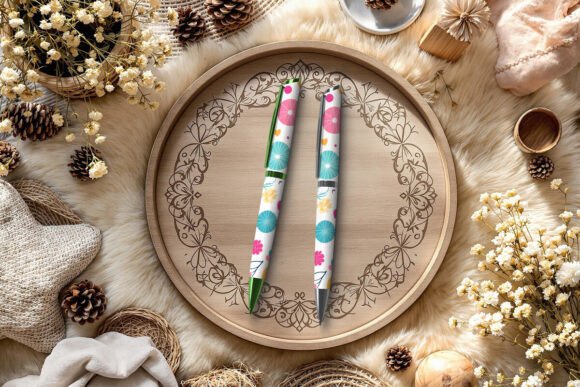
The visual characteristics of this specific mockup are engineered for realism. We aren’t talking about a simple 3D render that looks plastic and artificial. The Pen Wrap Mockup PSD offers a tactile quality; the textures suggest high-grade materials, whether you are aiming for a matte finish or a polished metallic sheen. This level of detail matters because it influences brand perception. When a potential customer sees a design presented on a high-resolution, 3000 x 2000 px canvas, the brain registers it as a premium product. It creates an immediate sense of professionalism and value that a flat image on a white background simply cannot achieve.
Furthermore, the versatility of the file—specifically the ability to adjust the background or the pen color—allows you to control the mood of the presentation. Are you designing for a luxury executive brand? A dark, moody background with a deep navy pen conveys authority. Creating branding for a vibrant, creative studio? A bright, clean background with a neon-accented pen suggests energy. This flexibility makes it an essential part of your design assets library, as it adapts to the narrative you are trying to tell rather than forcing you to adapt to a static template.
Strategic Applications: From Logo Design to Packaging
While the primary function is obvious, the utility of a robust mockup extends far beyond simple display. For graphic designers working on logo design or brand identity packages, this file is a client communication tool. Clients often struggle to visualize how a logo will wrap around a cylindrical object. By using smart objects to quickly apply their branding to this Pen Wrap Mockup PSD, you eliminate confusion and speed up the approval process. It proves that the logo works in three-dimensional space, maintaining legibility and impact when curved.
In the realm of packaging design and editorial design, the mockup serves as a hero image. If you are publishing a case study on Behance or updating a corporate brochure, a composite image showing two pens—one capped, one uncapped—adds depth to your storytelling. It allows you to highlight specific features of the design, such as how the typography handles the barrel versus the cap. For small business owners selling on platforms like Etsy or Amazon, these high-fidelity images are crucial for social media graphics and web design. A crisp, professional product shot can significantly increase click-through rates and conversions compared to a poorly lit photograph of a physical prototype.
Practical Usage and Workflow Integration
One of the most overlooked aspects of modern typography and design assets is the user experience of the file itself. A beautiful mockup that is disorganized or difficult to edit is frustrating. This particular asset is built with a focus on workflow efficiency. The organized layers and smart objects mean you aren't hunting through a chaotic layers panel to find the right mask. You simply click the designated layer, paste your design, and the perspective and lighting are automatically applied.
However, practical guidance is necessary for the best results. When applying your design, pay close attention to the readability of your text. A pen wrap is a narrow canvas. If your design relies on a complex serif font or a highly decorative script font, it may become illegible when wrapped around the curve. It is often advisable to use a clean sans serif font for contact information or taglines, reserving the more ornate display fonts for the main logo mark. Always test your design at 100% zoom to ensure the sharpness holds up.
Evaluating Fit and Font Pairing
When using this mockup to showcase a creative font or a premium font you have designed, consider the "personality" of the pen. The mockup includes options for different pen styles, which act as different stages for your typography. A sleek, minimalist pen suits a geometric modern typography style, while a classic fountain pen shape pairs better with a traditional serif font or an elegant handwritten font.
Think of the mockup as a testing ground for font pairing. You can experiment with how a bold headline font interacts with a lighter body font when wrapped around the barrel. Does the hierarchy remain clear? Does the typeface maintain its visual hierarchy? This is particularly useful for commercial font foundries looking to create marketing materials for their typefaces. Showing a font in use on a physical object demonstrates its versatility better than a standard pangram on a white page.
Ensuring Consistency and Professionalism
For agencies and freelancers, consistency across deliverables is key to building a strong reputation. Using a standardized mockup like this ensures that all your product presentations have a uniform level of quality. Whether you are presenting to a corporate client for promotional merchandise or a startup for corporate gifts, the visual language remains consistent.
It is also vital to respect the licensing terms included with the file. These assets are tools for your business, intended for personal and professional use to generate revenue for you. They are not to be redistributed as freebies. By adhering to these guidelines, you support the ecosystem of creators who build these tools, ensuring a continued supply of high-quality resources for the design community.
Ultimately, the Pen Wrap Mockup PSD is more than just a digital file; it is a bridge to better business. It empowers you to present your work with the confidence and clarity that today’s competitive market demands. By leveraging its customizable features and high-resolution output, you can transform a simple concept into a tangible, desirable product that resonates with your audience and elevates your brand identity.