Mastering Your Visual Message: The Webinar Canva Template Pack
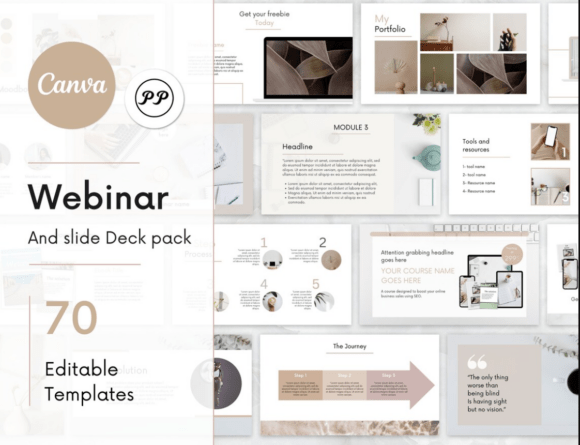
In the digital landscape, the difference between a webinar that captivates and one that confuses often comes down to visual consistency. You might have the best content in the world, but if your slides look disjointed or amateurish, you risk losing your audience's attention. This is where the Webinar Canva Template steps in. It is not merely a collection of slides; it is a comprehensive design system built to bridge the gap between professional presentation standards and user-friendly editing. Designed for the modern creator, this template pack allows you to create both beautiful webinars and eye-pleasing course slides without needing a degree in graphic design.
A Holistic Approach to Course Presentation
What makes this specific Webinar Canva Template stand out is its understanding of the student journey. It isn't just about showing data; it's about guiding your audience from introduction to transformation. The pack includes a robust set of 4 Cover slides and 6 Intro slides, but it goes deeper into the pedagogical structure of your offering. You will find dedicated slides for "How your course will help you," "This is for you if...", and crucially, "This is not for you if..." slides. This level of specificity helps in pre-qualifying your leads and setting clear expectations, which is a hallmark of professional brand identity work.
The visual characteristics of this template pack are designed with clarity and modern typography in mind. It avoids the clutter that plagues many presentation decks. Instead, it utilizes a clean aesthetic that prioritizes whitespace and readability. Whether you are using a sans serif font for headings or a serif font for body text, the layout accommodates high-contrast font pairing naturally. The personality of the design is confident and authoritative, yet approachable—perfect for coaches, consultants, and educators who need to build trust quickly.
Practical Application and Design Assets
From a practical standpoint, the Webinar Canva Template is a powerhouse of design assets. It includes 9 Chart Slides, which are essential for anyone presenting data, statistics, or progress reports. In editorial design, data visualization is key to retention; these charts allow you to present complex information in a digestible format. Furthermore, the inclusion of 5 Module showcase slides and "Course steps" slides ensures that your curriculum is laid out logically. This structure mirrors high-end web design principles, where user experience (UX) dictates the flow of information.
For those involved in social media graphics and digital marketing, the utility extends beyond the live webinar. The "Course promotion" slides and "Mood board" sections are versatile enough to be repurposed for Instagram carousels or LinkedIn posts. The creative font usage within the template allows for modern typography trends to shine through, ensuring your content feels current rather than dated. Whether you are working on packaging design concepts or a digital product launch, the visual language remains consistent.
Streamlining Your Workflow
The ease of use is perhaps the most significant selling point. The instructions are straightforward: after purchase, you receive a PDF with an invitation to edit. This direct link saves you the hassle of searching through Canva’s library. Once you save a copy to your account, the customization begins. This is where the template acts as a premium font playground. You can swap out the default text for your preferred typeface—perhaps a bold display font for impact or a handwritten font for a personal touch.
Consider the "Testimonials and FAQ" slides included in the pack. In marketing, social proof is currency. These slides are structured to highlight quotes effectively, ensuring that the text is legible against various background elements. This attention to readability is what separates amateur designs from professional creative work. The template ensures that your logo design placement is prominent yet unobtrusive, reinforcing your brand identity throughout the presentation.
Maximizing Impact with Visual Hierarchy
Understanding visual hierarchy is crucial when using any template. The Webinar Canva Template provides a scaffold, but you must ensure your content fits the structure. When you edit the "Benefit of choosing us" slides, for example, use strong, bold text to emphasize key value propositions. This is where a display font can be particularly effective for headers, drawing the eye immediately to the most important information.
The "Tool and resources" slides are another area where you can demonstrate expertise. By listing the software, apps, or physical tools you recommend, you position yourself as a curator of value. Visually, this is an opportunity to use icons or imagery that align with your brand identity. The template’s grid system ensures that even if you add multiple items, the slide doesn't feel overcrowded. This balance is essential for maintaining audience engagement, particularly in longer webinars or course modules.
Finalizing Your Presentation Strategy
Finally, the pack includes a "Final Slide and contacts" section. Never underestimate the power of a strong closing. This slide should be your call to action—whether it’s visiting a website, booking a consultation, or downloading a freebie. The template is designed to handle this transition smoothly, guiding the viewer’s eye to your contact details or social handles.
In summary, the Webinar Canva Template is more than just a set of slides; it is a strategic tool for publishers, entrepreneurs, and content creators. It combines the aesthetic appeal of modern graphic design with the functional needs of a digital course. By leveraging the included sections—from the course timeline to the case study slides—you can build a presentation that not only looks professional but also effectively communicates your unique value proposition. It is an investment in your visual communication strategy that pays dividends in audience trust and engagement.